Forex Dashboard
INSTRUMENTS
The list of instruments that now you can follow is very long and we added all the major stock indexes as well as all the most important commodities more than doubling the original ones.
Here’s the complete list:
- AUD – Australian Dollar- CAD – Canadian Dollar- CHF – Swiss Franc- EUR – Euro- GBP – British Sterling- JPY – Japanese Yen- NZD – New Zealand Dollar- USD – US Dollar- GOLD- SILVER (new)- OIL- NATURAL GAS (new)- DOW JONES (new)- STANDARD&POORS 500 (new)- NASDAQ 100 (new)- NIKKEI 225 (new)- EURO STOXX 50 (new)- DAX (new)- CORN (new)- WHEAT (new)- SOYBEAN (new)
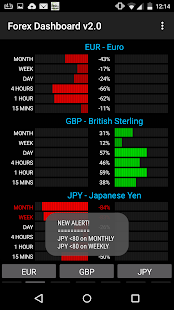
ALERTSThe app sends audio an visual alerts when an instrument has a score above 80 or below -80 you’ll be alerted immediately in order to look for a potential interesting trade.
PAGESYou have 7 pages completely customizable with your sets of instruments.
Each page has 3 slots that you can use.
Passing from one page to the other is done with a simple swipe left or right.
Can’t be easier.
AUTOMATIC CONFIGURATION SAVEThe app automatically remembers your pages customization and when you’ll reopen it, you’ll see things as you left them.
Why Use Forex Dashboard App?
This will give you, not only an overview of the currency situation, but also details on how it is performing in the short term as well.
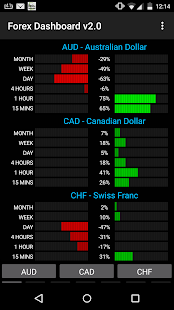
The strength/weakness score goes from -100 to 100 and is calculated using all the pairs in which the currency is involved in.
So when for example you see a strong EUR and a weak USD, it means that EUR is strong vs all the other currencies and that the USD is weak versus all the other currencies.
This information makes a Long (buy) trade on EURUSD much more interesting.
By analysing the single currencies, the Forex Dashboard App will help you choose the best pairs to trade.
Simply take the currency or the currencies that are stronger and match with those that are weaker.
You can easily spot them as the stronger ones have green histograms while the weaker ones are red.
Also, when the score is greater than 80 or lower than -80, the text label of the period becomes green or red accordingly.
This can be an interesting entry signal...
or at least the first half of it.
Now, to be sure, you need another pair that in the same time frame is giving the opposite signal.
At this point you can enter a Long (buy) OR Short (sell) trade on that pair.
Depending on the time frame, you should have different targets ranging from a few pips to whatever works best on the time frame you are trading.
It can be that easy!
How To Trade With The Forex Dashboard App?
You can trade the Forex Dashboard App on its own by using the signals described above, or (even better) integrate it into your trading system and it'll help you in your trading decisions.
The strength and weakness of two currencies can easily help you understand the trend of a pair.
From the long term to the short term.
Remember...
the trend is your friend and the best trends come when there is a divergence between two currencies, i.e.
when one is strong and the other is weak.
IMPORTANT:
- Remember that the Forex Market is open between Sunday night at around 10PM UT up to Friday night at the about the same time.
So, during the weekend, currency scores won't change.
- The Forex Dashboard App uses data coming from the Internet so please check you have enough credit if used on mobile networks!
- The app automatically keeps the screen on so if you want to dim it, press the power button.
Info: [email protected]: [email protected]
http://PimpMyEA.com
About Forex Dashboard
- Package name (App ID)
- com.pimpmyea.forexdashboard
- Available on
- Google Play
- Price
- Free
- Developer
- Forex Signals | FxPremiere Group FX Signal Service
Looking for the Forex Dashboard APK?
The safest way to get Forex Dashboard (com.pimpmyea.forexdashboard) on your Android device is to install it directly from Google Play — you'll always get the latest official version, automatic updates, and no risk of modified or infected APK files from third-party sites.
Music Features
Enjoy high-quality music streaming and playback features.
Social Features
Connect and share with friends and the community.
Financial Tools
Manage your finances and track your expenses easily.
See Forex Dashboard in Action

Frequently Asked Questions
Is Forex Dashboard free?
Yes, Forex Dashboard is free to download and install on Android through Google Play.
How do I install Forex Dashboard on Android?
Open Google Play on your Android phone or tablet, search for Forex Dashboard by Forex Signals | FxPremiere Group FX Signal Service or tap the Google Play button on this page, then tap Install. The app downloads and installs automatically.
What is com.pimpmyea.forexdashboard?
com.pimpmyea.forexdashboard is the App ID (package name) of Forex Dashboard on Google Play. Every Android app has a unique package name, and it is the safest way to verify you are installing the official app.
Is Forex Dashboard safe to download?
Installing Forex Dashboard from Google Play is the safest option: you get the official version published by Forex Signals | FxPremiere Group FX Signal Service, verified by Google Play Protect, with automatic updates. Avoid APK files from unofficial third-party sites.
Get Forex Dashboard Today
Forex Dashboard for Android — free download on Google Play.
Compatible with Android phones and tablets — available on Google Play.
Ask AI about this app
Get instant answers about features, tips and more from popular AI assistants.